Approve or reject a document
Open the Approval inbox, review a document that's waiting on you, and record an approve or reject decision with notes.
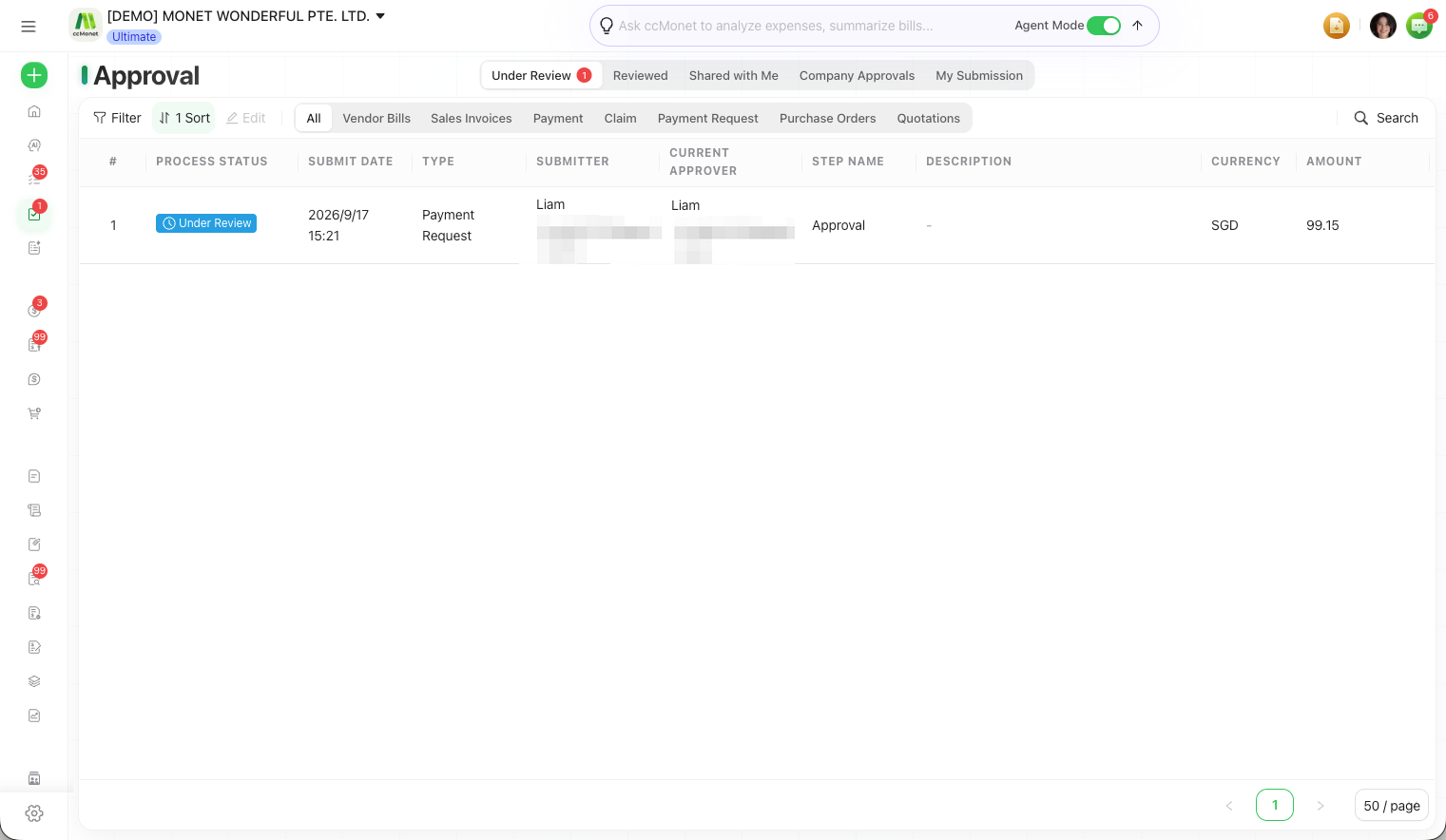
The Approval inbox gathers every document routed to you for review — vendor bills, sales invoices, payments, claims, purchase orders, payment requests, quotations and more — so you can approve or reject them from one place.
- A document has been Submitted for Approval and you are an assigned approver on the current step.
Find what's waiting on you
Open the Approval inbox
In the left sidebar, open Approval. The top switch controls whose approvals you're looking at:
| View | Shows |
|---|---|
| Under Review | Documents waiting for you to approve now |
| Reviewed | Documents you've already handled |
| Shared with Me | Documents you were CC'd on |
| My Submission | Documents you submitted |
| Company Approvals | Everything across the organization (owners only) |
A red count on Under Review tells you how many items still need you.
Narrow to one type
Use the module tabs — All, Vendor Bills, Sales Invoices, Payment, Claim, Payment Request, Purchase Orders, Quotations — to focus on a single kind of document.
Open a document
Select a row to open the document. Each row shows its Process Status, Submit Date, Type, Submitter, Current Approver and Step Name, so you can see where it is in the flow before opening it.
Approve or reject
Review the document
Check the details of the document the same way you would when editing it. If your role allows, you can adjust it before deciding.
Add a note or attachment (optional)
In Approval Notes, add a comment for the record, and attach supporting files if needed.
Record your decision
- Select Approve to sign off. When your step is the last one required, the document becomes Approved and is locked.
- Select Reject to send it back. The submitter can fix the document and resubmit.
Approval statuses
A document moves through these statuses:
| Status | Meaning |
|---|---|
| Draft | Saved but not yet submitted |
| Under Review | Submitted and waiting on one or more approvers |
| Approved | All required steps approved; the document is locked |
| Rejected | Sent back to the submitter |
| Revoked | An approved document was unlocked again |
| Recalled | The submitter pulled the document back out of review |
When a step is a Joint approval, every approver on that step must approve; when it's an Alternative approval, any one of them can. The Current Approver shown on the document reflects this.
Approving a document locks it so it can't be edited, and it may then be posted according to that document's own module rules. Approval itself doesn't choose accounts or tax treatment. If you need to change an approved document, it must be Revoked first (see below), and what posting an approved bill, invoice or payment does to your ledger is best confirmed with your accountant.
Revoking or recalling
- A submitter can Recall a document that's still Under Review to pull it back and edit it.
- An Approved document can be Revoked to unlock it for changes — but only within the rules. For example, an invoice already included in a Statement of Account (SOA) can't be revoked until that SOA is voided.