Merge duplicate products
Consolidate several AI-recognized product names under one preferred product so price tracking and reports stay accurate.
Because AI recognition reads the product name printed on each document, one product often ends up stored under several near-identical names. Merging brings those variants together under a single preferred name, so the product's history, price tracking and reporting are all in one place.
- You're on the Items catalog, under Master Data in the left sidebar, on the Sales or Purchase side.
- You've confirmed the records are the same product.
Merge products
Select the products to merge
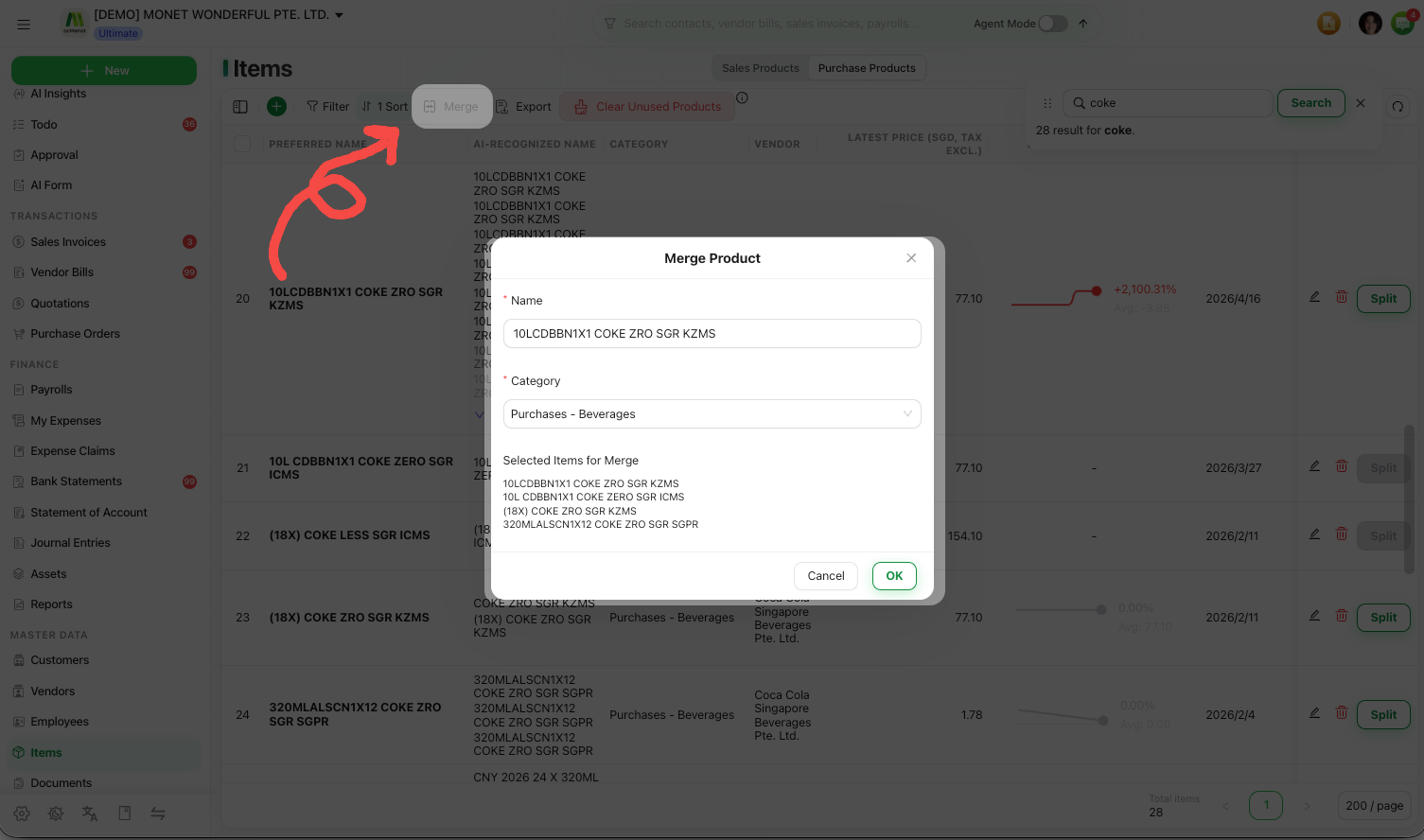
In the catalog, select the product records that are really the same thing.
Open Merge
Choose Merge. CCMonet asks which product to keep as the preferred record.
Choose the preferred name
Pick the product whose name you want to keep as the preferred name. The other names become recognized variants that roll up to it.
Confirm
Confirm the merge. The variants now report as one product, and future documents that use any of those names map to it.
Merging products can't be undone. If you later find two genuinely different things were merged, you can separate them again — see Split a product into separate items.
Find duplicates to merge
CCMonet's Todo list flags likely duplicate product names automatically, so recognized variants don't quietly pile up. Clearing those prompts keeps your catalog and price history consistent.