Create a bank rule
Set up a rule that auto-codes recurring bank transactions during reconciliation.
If the same kind of transaction shows up every month — a subscription, bank charges, a regular customer — a bank rule codes it for you automatically, so reconciliation goes faster.
- You're an Admin or Accountant.
Create a rule
Open Manage Bank Rules
On Bank Statements, select Manage Bank Rules.
Choose the rule type
Pick Receive money rule (money in) or Spend money rule (money out).
Set the conditions
Add conditions on the transaction's description, payee, amount or bank account, and choose whether all or any of them must match.
Set what the rule fills in
Choose the contact, category and transaction type the rule assigns, and optionally a note template for the reconciled entry.
Save and apply
Save the rule. You can apply it to unmatched transactions only, or to all transactions on the account.
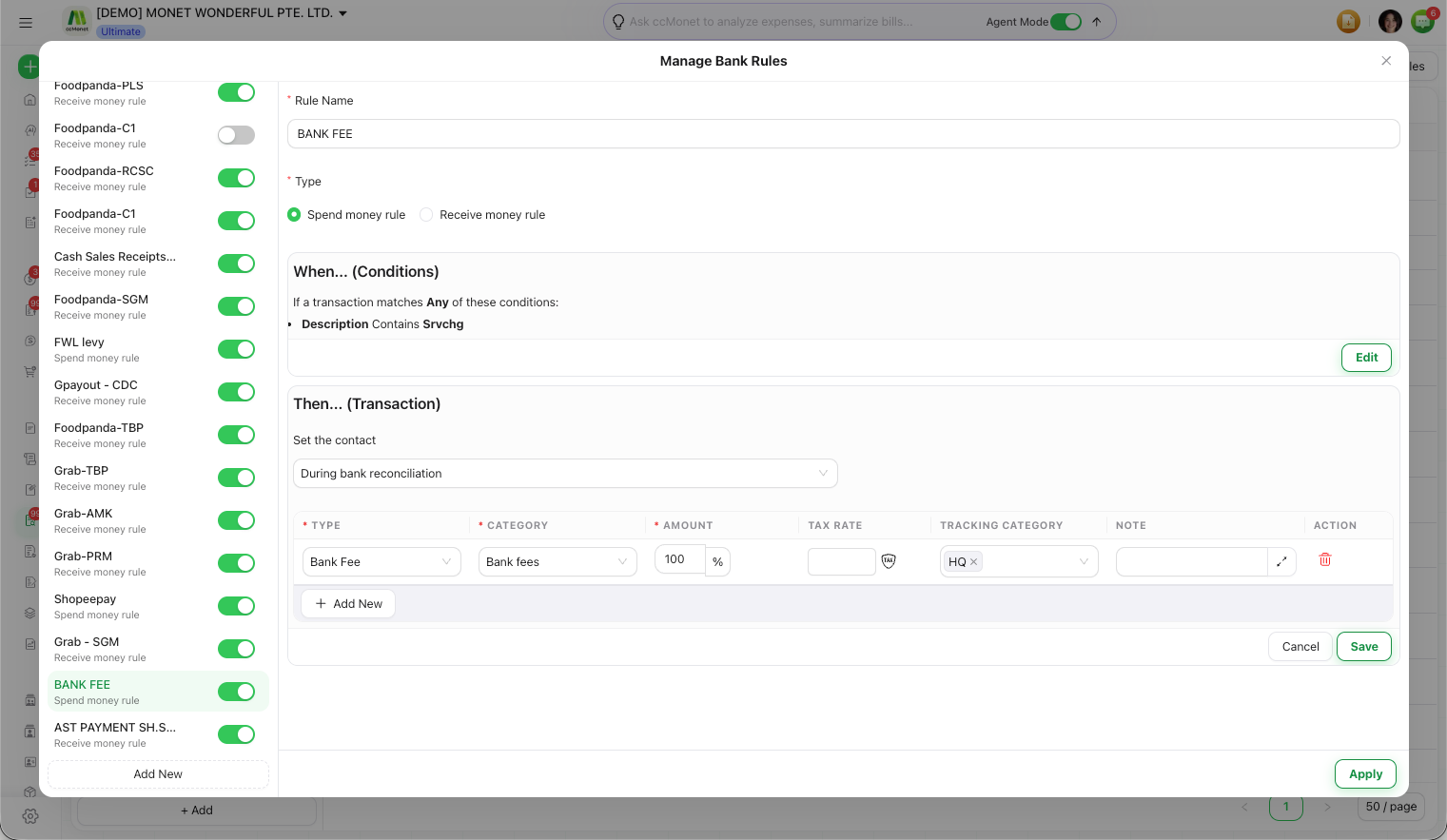
A rule assigns a category (and any tax code on it) to matching transactions, which is what determines how they post when reconciled. Double-check a new rule against a few transactions before applying it to all of them, so the category and tax treatment are what you expect.
Managing rules
Rules are reusable across reconciliations. You can edit a rule's conditions and values, or delete a rule you no longer need, from Manage Bank Rules.