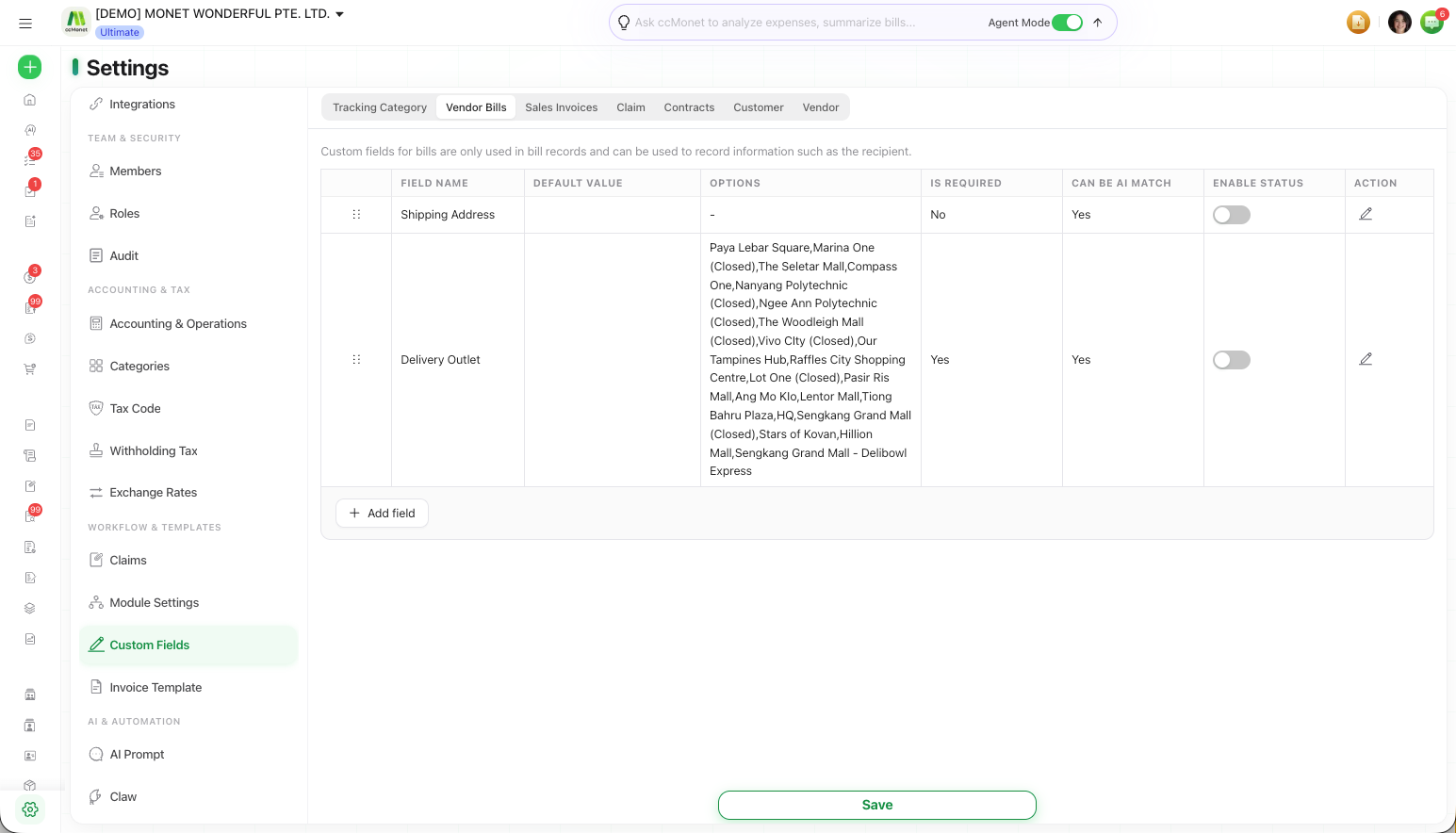
Add custom fields to bills, income, or claims
Define extra fields that appear on your income, bill and claim records, at the header level or the product line level.
Custom fields let you capture extra information on your records that CCMonet doesn't ask for by default. You can add them to Sales Invoices, Vendor Bills and Claim records — for example a salesperson on an invoice, a recipient on a bill, or a reason on a claim.
Custom fields are configured under Settings → Custom Fields, on the tab for each record type. (The same page also holds tracking categories.)
Custom Fields is an Owner-only settings page.
Add a custom field
Choose the record type
On Settings → Custom Fields, use the tabs to pick the record you want the field on — Sales Invoices, Vendor Bills or Claim.
Add the field
Add a field and give it a name. Each record type keeps its own set of fields:
| Record | Typical custom field |
|---|---|
| Sales Invoices | Distinguish information such as the salesperson |
| Vendor Bills | Record information such as the recipient |
| Claim | Capture information such as the reason for reimbursement |
Set the field level
Choose the Custom Field Level:
- Header Level — applies to the whole sales invoice or vendor bill.
- Product Level — applies to individual product lines.
Save
Save your changes. The field appears on new records of that type.